

Best Pet Monitoring Cameras: A 2026 Buying Guide
Table of Contents
- How We Evaluate Pet Monitoring Cameras
- Key Features to Look For in Pet Monitoring Cameras
- The 6L Smart Feeder With Camera: All-in-One Monitoring
- Should You Choose a Pet Camera With Treat Dispenser?
- Pet Camera Privacy and Security Standards Explained
- Pet Camera Subscription vs Local Storage: What's Best?
- Which Pet Monitoring Camera Fits Your Home?
- Final Thoughts on Choosing Pet Monitoring Cameras
- Frequently Asked Questions
Last Updated: September 6, 2026
Choosing the best smart cameras for pet monitoring in 2026 means balancing live video quality, two-way audio, and data privacy against a confusing sea of subscription models. Most guides focus on specs alone, but the real test is how a camera holds up during months of daily use, whether it actually calms a pet's separation anxiety, and whether your footage stays secure. This guide cuts through the noise to help you pick the right pet monitoring cameras for your home, your pet's temperament, and your budget.
We evaluate every option on the same criteria we use for our Bentley Approved products: clean design, honest materials, and features that solve real pet-parent problems. Below, we'll show you exactly how to compare resolution, field of view, storage options, and security protocols so you don't overpay for features your pet will never use. But first, here's what most guides get wrong: they treat pet cameras like home security devices, when the best pet monitoring cameras are actually behavioral tools that should adapt to how your pet lives.
How We Evaluate Pet Monitoring Cameras
Our evaluation process starts with a key metric: does this camera reduce stress for both you and your pet? We test units in real home conditions, monitoring connectivity stability, latency, and how pets actually react to the device. A camera with perfect specs is useless if your dog ignores the treat dispenser or your cat knocks it off the shelf.
Pet monitoring cameras can be scored across five weighted categories: video clarity including night vision and high-definition resolution, audio quality for two-way audio and sound detection, reliability of the mobile application and real-time alerts, privacy protections like encryption and two-factor authentication, and long-term durability. The Canadian Radio-television and Telecommunications Commission's consumer guide on connected devices notes that Canadians are increasingly concerned about how their smart home data is handled, which is why privacy encryption carries significant weight in our scoring.
| Evaluation Category | What We Test | Why It Matters |
|---|---|---|
| Video Quality | Night vision, wide-angle lens, digital zoom | Clear footage day or night |
| Audio | Two-way audio, sound detection | Comfort calls and bark alerts |
| Reliability | App latency, connectivity stability | No missed moments |
| Privacy | Encryption, two-factor authentication | Your home stays private |
| Durability | Mounting options, firmware updates | Survives daily pet life |
Key Features to Look For in Pet Monitoring Cameras
Pet monitoring cameras are distinct from standard security cams because they prioritize interaction over surveillance. But beyond the spec sheet, the most valuable feature is how well the camera helps you understand your pet's behavior. Top-ranking guides list pan-and-tilt and night vision; the real differentiator is whether the camera's software helps you interpret what you're seeing.
Look for pan-and-tilt capability and automated tracking so the lens follows your pet through the room, not just a fixed field of view. However, the more important feature for pet parents is motion event tagging. Cameras that categorize motion events (e.g., "person detected" vs. "pet detected") create a timeline you can scan quickly, rather than forcing you to scrub through hours of footage.
Motion detection and push notifications should be customizable, since a hyperactive puppy will otherwise flood your phone with alerts. But the most powerful use of these alerts is behavioral analysis. For example, if you're concerned about separation anxiety, a camera with a sound-event log can show you a pattern of barking or whining that starts 10 minutes after you leave and tapers off after 30. This data is more actionable than a single live-view check. A common pattern is that pets with mild anxiety will settle after a short period, while those with more severe distress may pace or pant for the entire absence. Knowing this distinction helps you decide if a camera alone is sufficient or if you should consult a veterinary behaviorist.
For pets with separation anxiety, two-way audio lets you speak calming words, but remember that your voice can sometimes increase distress if your pet cannot reach you. Instead of using the camera to intervene, use it to gather data. Record the first 30 minutes of your departure for a few days. Review the footage to see if your pet is engaging in self-soothing behaviors (like chewing on a specific toy) or destructive ones (like scratching at the door). This evidence-based approach turns a simple camera into a diagnostic tool.
A feature often overlooked in reviews is continuous recording vs. event-only recording. For behavioral analysis, continuous recording is essential. Event-only clips miss the quiet moments of restlessness that precede a full-blown anxiety episode. If a camera only records when it detects motion, you'll miss the subtle signs of distress like lip-licking or yawning that occur before your pet starts pacing. Look for a camera that offers 24/7 recording to a local microSD card, even if you primarily use cloud clips for convenience. This gives you the full behavioral picture when you need it most.
The 6L Smart Feeder With Camera: All-in-One Monitoring
Our top pick for most households is the 6L Smart Automatic Pet Feeder with WiFi & Camera, priced at $109.95. This Bentley Approved best seller combines scheduled feeding with live monitoring, solving two problems at once: your pet gets consistent meals and you get visual confirmation they are eating. The built-in camera streams in real time to your phone, so you can watch your pet approach the bowl and verify their appetite from anywhere.
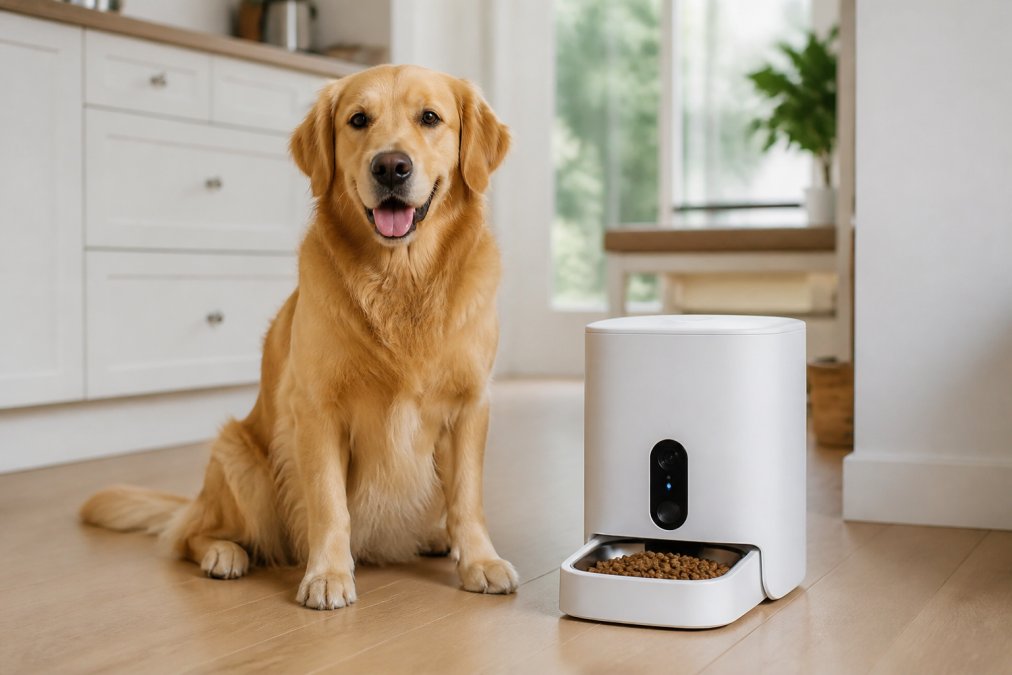
The 6L capacity holds enough food for multiple days, ideal for both dogs and cats, while programmable meal scheduling lets you set up to six portions per day with custom sizes. Voice recording allows you to call your pet to their bowl, and the dual power supply with battery backup means meals are never missed during a power outage. This is the feature set that matters most for busy pet parents who travel or work long hours, because it addresses feeding consistency alongside monitoring.
Should You Choose a Pet Camera With Treat Dispenser?
A pet camera with treat dispenser adds training potential, but it is not the right choice for every pet. Treat dispensers work best for dogs who are food-motivated and comfortable with mechanical sounds, since the dispenser mechanism can startle nervous pets the first few times it activates. For cats, treat dispensers are often less effective because felines may not respond to remote dispensing the way dogs do.
If your goal is behavioral reinforcement, consider whether you need a camera with a dispenser or simply a scheduled feeder that releases food at set times. The distinction matters: treat dispensers typically release small rewards on demand, while automatic feeders manage full meals. The 6L Smart Feeder covers the meal management side with its camera, and for play-based engagement, Bentley's Bark offers the Smart Automatic Cat and Dog Laser Toy for Pets at $49.95, which keeps pets active with three adjustable modes and four angles, plus a timing function for balanced activity and rest.
Pet Camera Privacy and Security Standards Explained
Privacy is the most overlooked factor when choosing pet monitoring cameras, and it should be your first consideration. Most reviews mention encryption and move on. This guide goes deeper because the threat model for a pet camera is different from a doorbell cam. A pet camera sits inside your most private spaces, often pointed at couches, bedrooms, and children's play areas. The Office of the Privacy Commissioner of Canada's guidance on smart devices emphasizes that consumers should verify whether a device offers encryption and secure authentication before purchase. But here's what most guides don't tell you: the weakest link is rarely the camera itself, it's your home network.
Secure your network first. Before you even unbox a new camera, ensure your home Wi-Fi uses WPA3 encryption (or WPA2 if WPA3 is unavailable). An unsecured network is an open door to any connected device. Next, set up a separate guest network specifically for your IoT devices. This is the single most effective step you can take. If a camera is compromised, the attacker is isolated on the guest network and cannot reach your laptop, phone, or NAS drive. Most modern routers support this feature, and it takes about five minutes to configure.
Understand the camera's authentication model. Look for cameras that support two-factor authentication on the mobile application, since this prevents unauthorized access even if your password is compromised. But also check how the camera handles session tokens. Some budget cameras use a shared cloud account system where multiple users log in with the same credentials, this is a red flag. A reputable camera should allow individual user accounts with distinct permissions (e.g., admin vs. viewer).
Data encryption applies to two paths: in transit and at rest. In transit means the video stream from the camera to your phone or the cloud server. This should always be TLS-encrypted. At rest means how footage is stored. A common mistake is assuming local storage is automatically more private than cloud storage; in practice, local storage protects against server breaches but leaves your footage vulnerable if the device itself is stolen or hacked. If you use a microSD card, consider encrypting it if the camera supports that feature. For cloud storage, verify the provider's data residency policies, Canadian users should confirm whether their footage is stored on Canadian servers or routed through the United States, which has different legal protections for consumer data.
Firmware updates are your first line of defense. Regular firmware updates are essential, as manufacturers patch known vulnerabilities over time, and a camera that stops receiving updates becomes a security risk. Before purchasing, check the manufacturer's track record for update frequency. A camera that received updates monthly for the first year and then went silent is a liability. Set a calendar reminder to check for firmware updates every 60 days, and enable automatic updates if the app supports it.
Finally, consider physical security. A camera with a privacy shutter or a physical lens cover is a worthwhile feature. It gives you a hard guarantee that no one is watching when you're home, regardless of any software bug or account compromise. This is a simple, mechanical solution to a digital problem, and it's a feature we prioritize in our Bentley Approved evaluations.
Pet Camera Subscription vs Local Storage: What's Best?
The subscription versus local storage decision comes down to how much footage you need to keep and how much you trust cloud services. Cloud storage subscriptions typically offer continuous recording, event history, and remote access from anywhere, but they add a recurring monthly cost to your pet monitoring setup. Local storage, usually via a microSD card, records directly to the device with no monthly fees, but you lose footage if the camera is damaged or stolen, and reviewing clips requires physical access to the card.
For most pet parents, a hybrid approach works best: use local storage for continuous recording and rely on the camera's free cloud clips for motion-triggered events. This gives you a full record of your pet's day while keeping the most important moments accessible from your phone. The 6L Smart Feeder avoids subscription complexity entirely, with its one-time purchase price of $109.95 covering the camera, feeder, and app control without ongoing fees. This makes it a strong value choice for Canadians who want smart pet monitoring without adding another monthly bill.
| Storage Option | Monthly Cost | Best For | Tradeoff |
|---|---|---|---|
| Cloud Subscription | $5-$15/month | 24/7 recording, remote access | Recurring fees, footage on servers |
| Local microSD | $0 | Budget monitoring, privacy | Manual review, card can fail |
| Hybrid | Varies | Event alerts + full record | Requires managing both systems |
Which Pet Monitoring Camera Fits Your Home?
Your home layout and pet's behavior determine which pet monitoring camera fits best. For open-concept spaces, a camera with pan-and-tilt and a wide field of view covers more ground, while smaller apartments may only need a fixed-position camera aimed at a feeding station or favorite napping spot. Multi-pet households should prioritize cameras with pet-specific AI that can distinguish between species, since a dog and cat with different needs require different monitoring approaches.
For cats, focus on cameras that integrate with interactive toys to combat boredom during the day. Bentley's Bark offers the Automatic Cat Teaser Laser Light at $39.95 and the Automatic Laser Cat Toy at $69.95, both designed to keep felines active while you are away. These toys pair well with a monitoring camera, letting you check in on your cat's activity levels and confirm they are getting exercise, not just sleeping all day. Consider mounting options carefully; cameras placed too high may miss ground-level pet activity, while low placements risk being knocked over by enthusiastic dogs.
Final Thoughts on Choosing Pet Monitoring Cameras
The best smart cameras for pet monitoring solve a specific problem: they give you peace of mind without adding complexity to your daily routine. Start by identifying your primary need, whether that is verifying meals, checking on separation anxiety, or keeping a bored cat entertained, and let that need drive your feature priorities. Avoid the trap of buying the most expensive camera with every bell and whistle when a simpler model with reliable night vision and solid two-way audio will serve you better.
At Bentley's Bark, we curate products that meet the Bentley Approved standard for quality and honest design, with complimentary shipping on every order. The 6L Smart Automatic Pet Feeder with WiFi & Camera represents the best balance of monitoring, feeding, and value for most pet parents, while our laser toys handle the entertainment side for cats. For more guidance on choosing the right pet monitoring cameras for your home, consult resources like the Canadian Veterinary Medical Association's pet wellness resources, then explore our full range of smart pet tech designed to keep your furry family members happy and your home clean.
Frequently Asked Questions
What is the best pet camera without a subscription?
The best pet monitoring cameras without a subscription are those with local storage options. Instead of paying a monthly fee for cloud clips, these models save footage to a microSD card or a home hub. This means no recurring costs and your video stays on your own network. Look for cameras that offer continuous recording or motion-triggered clips to local storage for a true subscription-free experience.
What features should I look for in a pet monitoring camera?
Start with video quality: a minimum of 1080p HD ensures you can see your pet clearly. Two-way audio lets you hear and speak to them, which can ease separation anxiety. Night vision is critical for checking in after dark. Pan-and-tilt features offer a wider field of view to follow your pet around the room. Finally, decide between cloud storage and local storage based on your privacy and budget needs.
Can I monitor my pets using a camera without a Wi-Fi connection?
Most smart pet monitoring cameras require Wi-Fi for remote viewing from your phone. However, some models support local network viewing, meaning you can watch the feed when you are on the same network without internet access. A few cameras also offer continuous recording to local storage, so you can review footage later, even if you couldn't watch it live. For true on-the-go monitoring, a stable Wi-Fi connection is essential.
What is the difference between cloud storage and local storage for pet cameras?
Cloud storage uploads video clips to the manufacturer's servers, allowing you to access them from anywhere and protecting footage if the camera is stolen or damaged. This usually requires a monthly subscription. Local storage saves clips to a microSD card in the camera. It has no ongoing costs and keeps your data private on your own network, but you must be home to review footage and the card can fail or fill up.
How do I secure my pet camera from hackers?
Start by changing the default password to a strong, unique one. Enable two-factor authentication if the app offers it. Keep the camera's firmware updated to patch known security flaws. Set up your camera on a separate guest Wi-Fi network to isolate it from your main computers. Finally, check the manufacturer's privacy policy to understand how your data is stored and used.
Choosing the right monitoring setup means weighing video quality, privacy protections, and storage costs against your pet's actual needs. Bentley's Bark takes the guesswork out of that decision with a curated selection of smart gadgets, each tested for clean design and honest materials, backed by complimentary shipping on every order. Get started with Bentley's Bark and find the pet monitoring cameras that give you true peace of mind.